


Drumplayer is a free drum VST plugin. It features drum sounds from our 99 Drum Samples library.
The free download link is located at the end of this article.
Why another drum plugin?
I always wanted to make a versatile free drum instrument that you can use to start making drum loops instantly.
Drums are the foundation of most music styles. Having a versatile drum rompler you can use as a starting point can save you a lot of time.
I contacted SampleScience, a developer who creates impressive sample-based instruments, to turn this concept into a real plugin.
The result is Drumplayer, a free drum VST that is user-friendly and easy to use. You can load it in your DAW to create a drum track and then layer it with synth VST plugins or a drum synth.
Drumplayer – A free drum VST plugin
Drumplayer includes twenty drum kits suitable for hip-hop, electronic, lo-fi, glitch, and experimental music. Each kit consists of fourteen sounds, including (but not limited to) kicks, snares, hi-hats, and percussion.
Drumplayer also features a 14-channel mixer with volume and stereo pan controls for each channel. The drums can be routed to AUX channels for additional processing in your digital audio workstation.
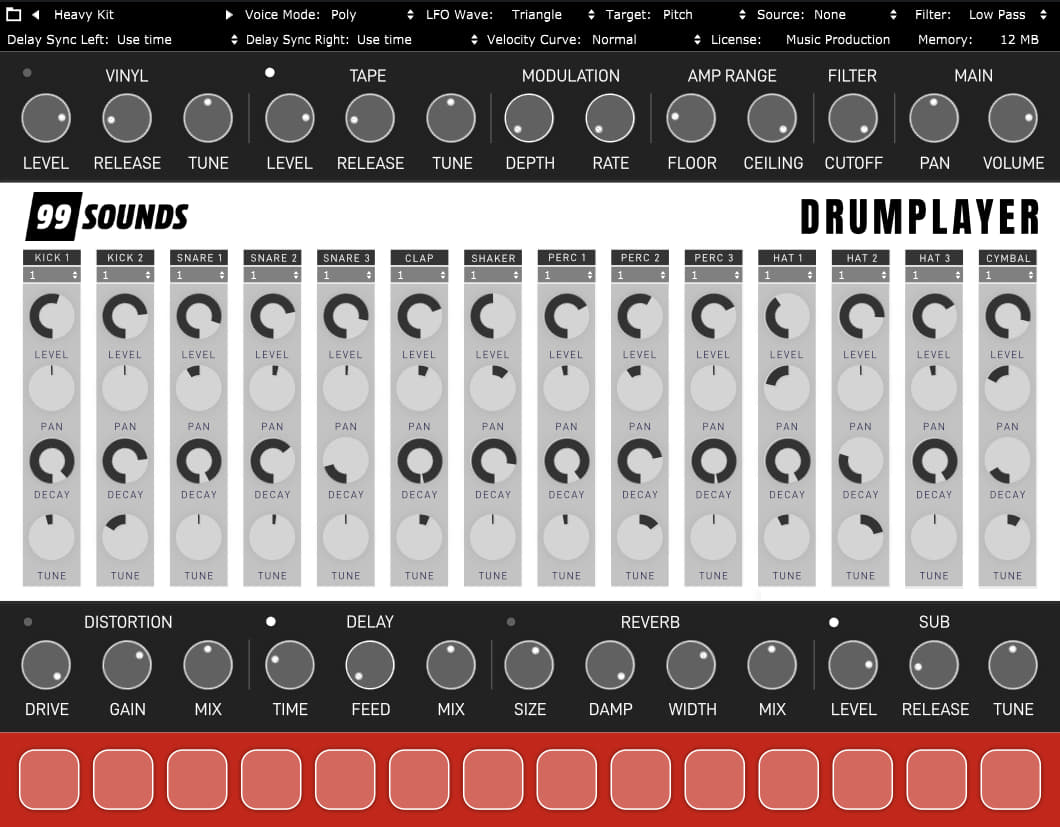
For example, you can route the kick drum to a separate audio channel in your DAW to apply compression, EQ, and other effects.
But you don’t have to use external effects for processing if you don’t want to. Drumplayer also features global pan and volume controls, distortion, filtering, reverb, delay, and other effects.
It also offers note velocity range adjustments and an LFO for pitch modulation. You can utilize these effects to customize the included drum kits to fit your project perfectly.
The drum kits
Each drum kit has a descriptive name to help you find the necessary vibe when working on a new project.
I included 808 kits, vinyl drums, electronic drum hits, and even a set of distorted acoustic drums. You will also find a set of old-school game console kits sampled from the Commodore 64 and a Nintendo Game Boy.
For drum machine aficionados, I included a set of excellent 808 and 909 samples. These were printed to a tape cassette for additional grit and saturation.
There are also two banks of bonus kick drums that you can use to find the right bass drum for your track quickly.
How to use this free drum VST
Drumplayer works best as a drum plugin for sketching new songs. You can quickly access instantly playable drum kits to create new rhythm tracks and then replace the plugin with other samples if needed.
Its main advantage is instant playability. You can easily load Drum Machine on a MIDI channel in your DAW and start playing in a matter of seconds.
There’s no need to import samples or create the kits from scratch. Drumplayer is a free drum plugin that you can pick up and play, just like an old-school hardware drum machine.
Compatibility
Drumplayer is compatible with 32-bit and 64-bit VST and AU plugin hosts on Windows and macOS.
For more information about the format, read our post about what VST plugins actually are.
Features
- 20 drum kits (Analog, Commodore 64, Cassette 808, Cassette 909, Dub, Dubstep, 80s, Electro, Game Boy, Heat, Heavy, LoFi, Samplefino, Tech, Thrash, Toy, Trap, Vinyl, Analog Kicks, Bonus Kicks)
- 14 drum channels (Kicks, Snares, Hi-hats, Percussion, Cymbals)
- Multi-out support (per channel)
- Volume/pan controls (per channel)
- Effects (global)
- Modulation (global)
- Adjustable velocity curve
- VST/AU plugin for Windows and macOS.

14 Comments
Hallo!
Ich habe Euren DrumPlayer runtergeladen und in meinem 2 VSTplugins-Ordner kopiert, aber mein DAW (StudioOne) erkennt das nicht. Es ist ja kein .dll -Datei zu sehen, liegt es vielleicht daran? Oder war eventuell Euer Download fehlerhaft?
Mit schönen Grüssen
dj.Den
Hi Den
The plugin is a VST3 (which has no DLL, by design). Although the instructions said to put it in your plugins folder, you specifically need to extract the whole thing to your VST3 folder. On Windows, this is: C:\Program Files\Common Files\VST3\
I hope this helps. Maybe they will improve the instructions or also release a VST or VST2 version. :)
Cheers,
Leroi
Whoops, I actually downloaded the VST3 version so that’s why my instructions apply. If you downloaded a different version (they *are* available) then the instructions will be a bit different. If applicable, be sure to refresh your plugins library in Studio One.
Is it suitable for every gameboy?
Just tried this new kit in Cubase. Thanks for creating it. Always nice to see new drum kit ideas. I installed the VST3 version. My midi keyboard when trying to trigger the sounds only work on the first key of the keyboard which triggers the last pad sound in the interface. It looks like the range is off and there is no way as far as I can see to move the keyboard triggers up on the keyboard to play the full range of drums. Hope this makes sense in how I’m explaining it.
If I mute individual tracks and then unmute them again, the sound does not come back. Use VST3 version on Mac, cool tool, thanks!
Does this plugin also support 3/4 and 6/8 time signatures?
Très bien
My DAW crashes when I use any other kit than the default, specifically not right away but after saving and trying to reopen the project, any ideas?
I had the same issue but I just solved it with fresh install: the problem apparently was that I had the full Drumplayer folder with the kits and the .vst3 file saved in two places at the same time, one in Documents, and one in the C:\Program Files\Common Files\VST3, with REAPER set to scan both folders to find the plugin. I guessed that was probably causing Reaper a headache, and deleted the one Drumplayer folder in Documents, as well as all its associated files in AppData\Roaming for a fresh start. It worked, now I can save and reopen the project with no issue. I used Everything on Windows to locate all the folders
Nope, it just crashed again. Only worked once for me :(
The best way for now seems to change from the kit you’re using to Analog Kit before saving every time, and after loading the project later, to switch back from default Analog to the one you were using before. Trying to load any other kit from the file explorer, even if it’s the same Analog Kit, causes it to crash after saving with it and reopening the project later
Para aquellos que reciben un error, por ejemplo se cierra su daw (en mi caso reaper) cuando desea cargar el proyecto con este plugin, resuélvalo cargando los kits que viene con él en la carpeta de instrumentos del plugin (los de extensión .mse) en la carpeta de instrumentos de otro plugin similar, por ejemplo Drum8 y utilize los kits y samples del drumplayer en el drum 8
English:
For those who receive an error, for example your daw is closed (in my case reaper) when you want to load the project with this plugin, resolve it by loading the kits that come with it in the instruments folder of the plugin (the .mse extension ones) in the instruments folder of another similar plugin, for example Drum8 and use the drumplayer kits and samples in drum 8
Lowuou All